🇵🇱 Handcrafted in Poland since 2014 • Shipping Worldwide
🎓 Back to School & University! Get 8% off all ready-to-use and pre-soldered keyboards until September 30. Use code: BACKTODESK
A mouse wheel is surprisingly bad at anything that needs precision. Stepping frame by frame along a timeline, zooming a schematic in KiCad, panning a view in CAD. You do it hundreds of times a day with one index finger that also has to hold the mouse and aim at the interface.
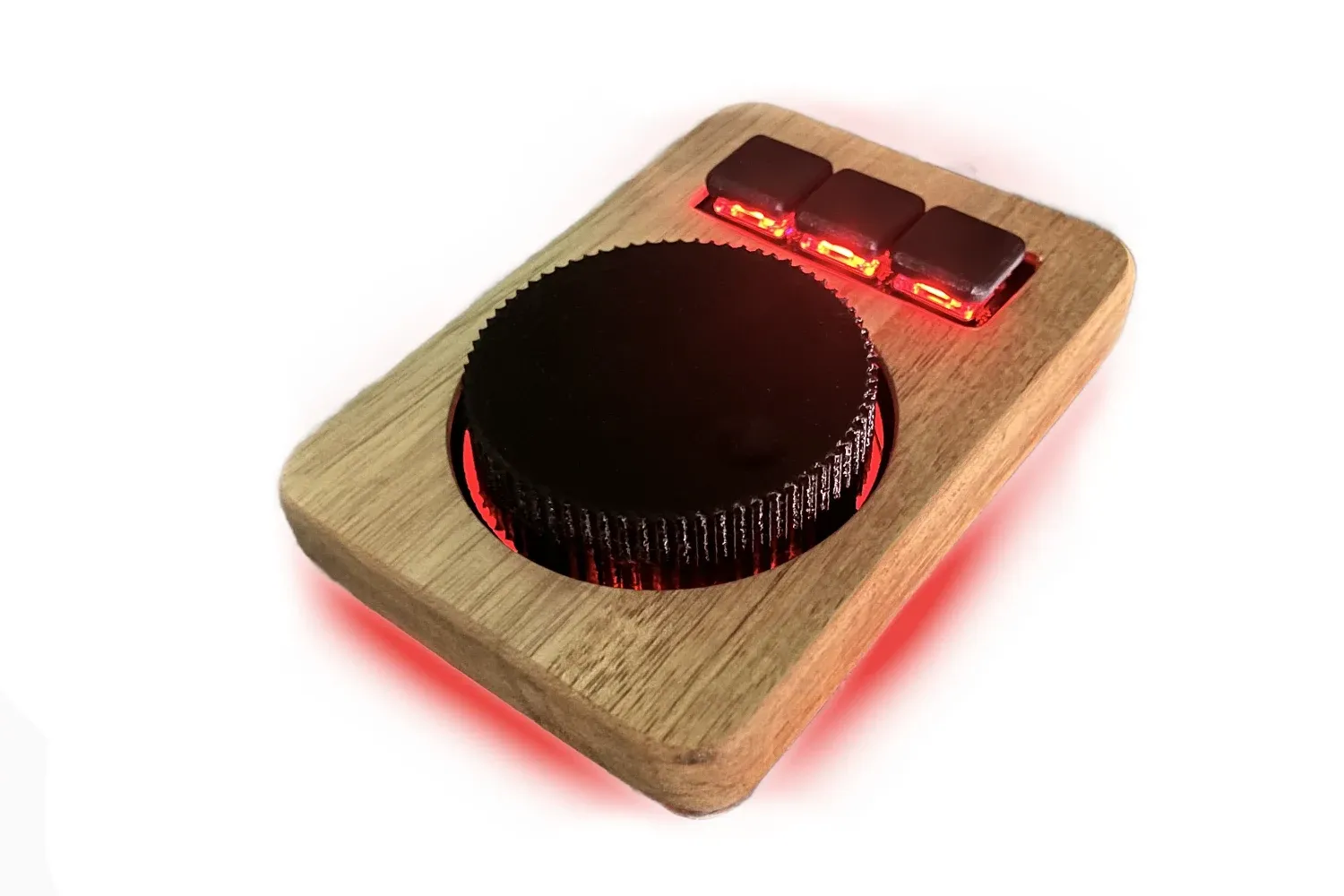
DirLock takes that off the mouse. Three keys and a weighted wheel that sits next to your keyboard and does one thing: it lets you turn instead of click.
I built it for myself first, for laying out boards in KiCad. A friend tried it for video editing in DaVinci Resolve, stepping through footage frame by frame, and two days later asked when he could buy one. That is where this product came from.
Inside sits a real 47 mm bearing. The wheel has mass and momentum, so it spins smoothly instead of jumping from detent to detent. Position is read by a contactless AS5600 magnetic sensor, which means no contacts to wear out and start dropping steps.
Scrolling accelerates with how fast you turn. Turn slowly and you move frame by frame or line by line. Turn quickly and you fly through a whole document. That is jog wheel behaviour, familiar from professional editing consoles, in something that fits beside your keyboard.
The firmware exposes wheel rotation in both directions as separate virtual keys. As a result, zmk.studio shows five fields you can map: three physical buttons plus rotate left and rotate right.
All of the configuration happens there and nowhere else. Plug DirLock in with a cable, open the page in Chrome or Edge, and click. Key assignments, shortcuts, macros, layers, all of it is changed with a mouse and saved with one button. Nothing to install, no firmware to compile, no GitHub account and no config files.
Layers work exactly as they do on a keyboard, so one button switches the whole set of functions and the same five fields cover several applications at once. One layer for video editing, one for CAD, one for the browser.
LEDs sit under the buttons and under the wheel itself, shining through a light-transmitting base. The result is a glow around the wheel and under the keys, visible out of the corner of your eye without looking away from the screen.
The colour tells you which layer is live, so you never have to guess whether the wheel is scrubbing the timeline or changing zoom.
The light responds to the wheel. As you turn it, the glow underneath travels with it, as though a ring of light were spinning below the base. It is not decoration for its own sake: out of the corner of your eye you can see which way and how fast you are moving, without looking at your hand or at an indicator on screen.
Both versions run on an nRF52840 controller compatible with the nice!nano v2, on ZMK firmware. The wired version connects over USB-C. The wireless version connects over Bluetooth Low Energy and also works over a cable, so a flat battery never leaves you with a dead device.
The three buttons above the wheel are Kailh Choc v1 switches in hot swap sockets. They push in by hand and come out with a puller, so you can change the weight and the sound whenever you like.
I mill the top panel from solid acacia on my own CNC and finish it by hand. The first run is made in this version only. Acacia has strong, contrasting grain, so no two units look alike and none of them can be repeated.
The wheel and the keycaps are 3D-printed from recycled PETG. I buy the filament ready-made rather than reprocessing it here, so I am not going to pretend these are bottles collected in the workshop. I simply pick recycled material where it performs as well as new, and on a wheel it performs very well: PETG is tough, slightly flexible and does not go brittle.
The knurled edge of the wheel is printed to shape rather than cut afterwards, so your finger gets a secure grip with no sharp edges.
Underneath sits a PCB I designed myself, rather than a nest of hand-soldered wire.
| Version | Dimensions | Weight |
|---|---|---|
| Wired | 127 x 92 x 24 mm | 142 g |
| Wireless | 127 x 92 x 27 mm | 170 g |
The wireless version is 3 mm taller and 28 g heavier, because it holds a battery. That weight works in your favour: the unit stays put while you turn the wheel one-handed.
I am not going to tell you DirLock saves the planet, because it does not. I will tell you what I actually do.
It is made on my own power. Panels on the workshop roof run the CNC, the lasers and the 3D printers. In summer, with decent sun, your wheel is milled and printed with almost nothing drawn from the grid.
Wood from offcuts. The panel is 127 by 92 mm, so it comes from pieces of acacia too small for a keyboard case. Instead of going into the stove, they go under the cutter.
Recycled PETG for the wheel and the keycaps, as described above.
It can be repaired. Switches change by hand, no soldering. The wheel and the keycaps I can reprint and post to you. The controller sits in sockets rather than being soldered down. If something stops working three years from now, send it back and I will fix it. You pay for parts and shipping only.
That last point matters more than everything above it. The greenest device is the one you do not have to buy twice.
DirLock is finished and working, but I do not have ten of them sitting on a shelf. Components for something like this are worth ordering in a batch, which is why I sell it as a pre-order.
How it works in practice:
I am not giving a fixed date, because it depends on how quickly the ten come together and how quickly the parts arrive. If the wait stops suiting you, write to me and I will refund you, no questions asked. The pre-order price is below the final catalogue price.
I mill, solder, assemble and test every unit myself in the FalbaTech workshop. Natural wood carries subtle differences in shade and grain, which is the mark of genuine handwork.
Questions before ordering? Write to contact@falba.tech. I answer personally.
🇵🇱 Handcrafted in Poland since 2014 • Shipping Worldwide
🎓 Back to School & University! Get 8% off all ready-to-use and pre-soldered keyboards until September 30. Use code: BACKTODESK