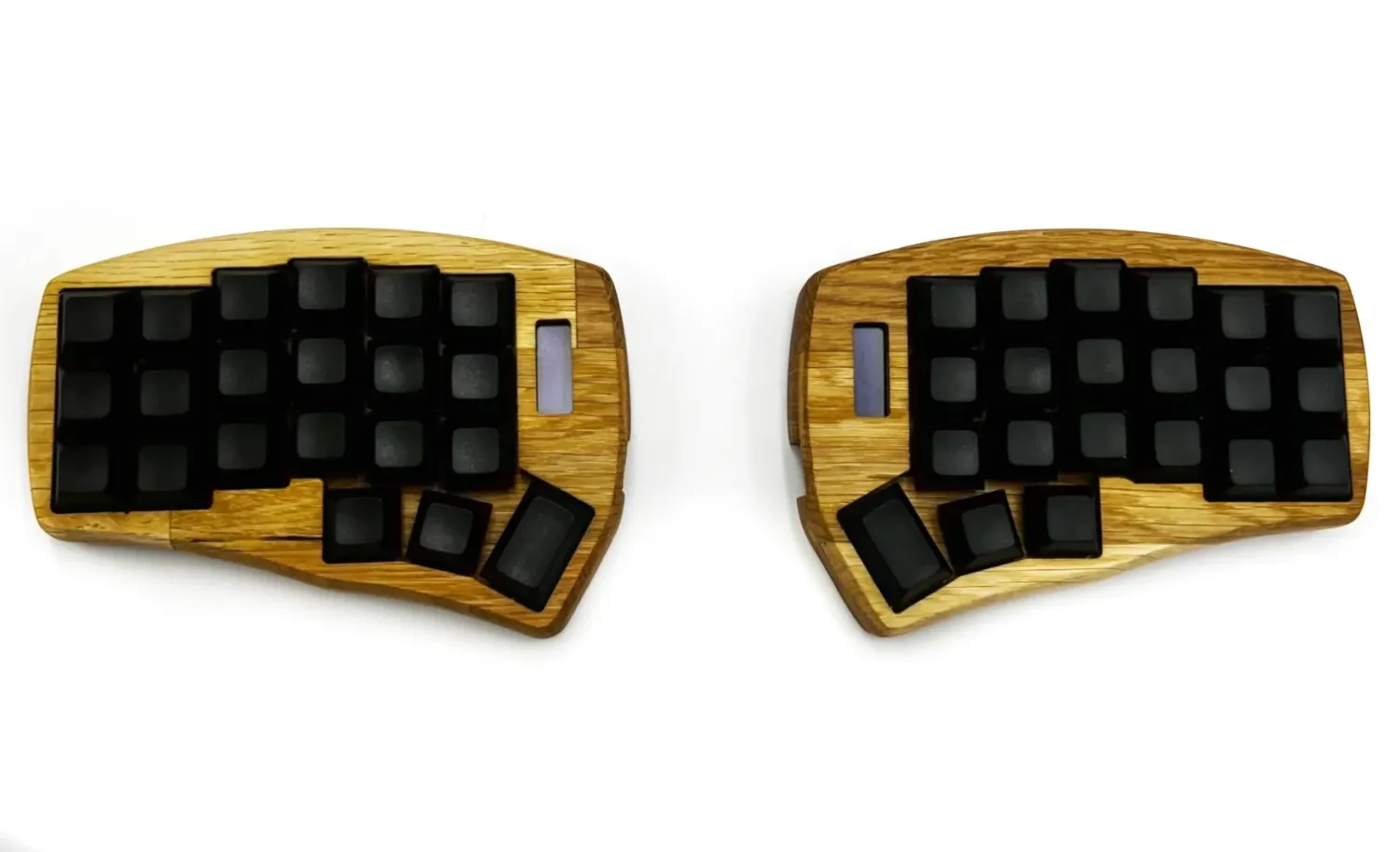
Corne FT / Corne Mini (HeliDox): 42 or 36 Key Split Ergonomic Mechanical Keyboard, Wired or Wireless
€260.16
Connection
Please choose
Version
Material
Please choose
Case
Finish case
Oled Screen
Tilt / tent set for case
Select the version of the cable
Please choose
Color cable:Black
Blue
Yellow
Red
Green
Grey
Black
Type of USB to your PC
Switches set
Please choose
Let us know which switches you’d like us to order for you, this will extend the order processing time by the duration of their delivery to us.
Enter your text
Keycaps Set
Please choose
RGB Backlighting under the switches
Do you have any suggestions or additional information?
Enter your text
Wrist rest set
Please choose
oriBag™, Custom Fit Felt Case
Please choose
Premium Felt Desk Pad
Please choose
In stock
1
Customer reviews
Reviews only from verified customers
No reviews yet. You can buy this product and be the first to leave a review.
Have questions?
Estimated delivery time
Shipping: 3–70 days
Corne FT / Corne Mini (HeliDox): 42 or 36 Key Split Ergonomic Mechanical Keyboard, Wired or Wireless
Product Details
Corne FT, the smallest keyboard you can actually work on
People find the Corne once they start noticing how often their fingers leave the home row for a number or an arrow key. It has 42 keys, all of them reachable without lifting your wrist off the desk. It sounds like too few. Two weeks in, it turns out to be exactly enough.
My name is Jan Falba. Since 2014 I have built every ergonomic mechanical keyboard here myself: I mill the case on my own CNC, solder the electronics, test it on macOS, Windows and Linux, and pack it for shipping. This keyboard does not come off a production line and it does not sit in a warehouse. It gets built once you order it, which is exactly why I can make the configuration you actually need.
Who the Corne is for
- You type for many hours a day and want to position your hands and arms more naturally.
- You write code and reach for symbols more often than for letters.
- You want the smallest ergonomic mechanical keyboard you can still work on properly.
- You want to design your own layers rather than live with someone else's.
- You travel often and need something that fits in a backpack next to a laptop.
- You already use a split keyboard and want to go lower on key count.
42 or 36 keys
The same product covers both: pick Classic 42 key or Mini 36 key, also known as the Corne Mini or HeliDox Mini. The difference is the outer column of keys on each side.
Forty-two is the safer first step, because it keeps Tab, Shift and Escape where your fingers expect them. Thirty-six forces you to rethink your layout from scratch, but it keeps hand movement to a minimum, with nearly every function directly under your fingers. Both versions cost the same, so the choice comes down entirely to how you prefer to work.
Why a split keyboard
A regular keyboard sits your hands too close together and angles your wrists inward. Do that eight hours a day for ten years and your body eventually sends the bill.
Two independent halves let you place each one shoulder-width apart, exactly where your arms end. After a few days you catch yourself pushing them further apart still. There is also room between the halves for a mouse, notebook or tablet.
Add a tilt/tenting kit and the halves angle inward until your thumbs sit higher than your pinkies and your forearms stop rotating. This changes the position of your hands and forearms, rather than simply adding a soft pad under your wrists.
Columns, not diagonals
The Corne uses a column-staggered ergonomic layout. Keys sit in straight columns, and each column is offset to match the real length of the finger that reaches it. Your index finger reaches farther, while your pinky has a shorter reach. Your finger moves up and down rather than sideways at an angle, the way a layout inherited from 19th-century typewriters makes it.
The first few days can be frustrating. Your speed returns with practice, and once you adjust, a regular keyboard starts to feel strange.
Wired or wireless
The key layout is identical in both versions. Same key count, same layers, same muscle memory. If you ever switch, there is nothing new to learn.
| Feature | Wired | Wireless |
|---|---|---|
| Firmware | VIAL | ZMK |
| Connection | USB-C | Bluetooth LE and USB-C |
| Configuration | VIAL app or compatible browser version | ZMK Studio, browser |
| Controller | RP2040 | nice!nano v2 |
| Power | from the USB cable | two 1000 mAh batteries, each charged separately over USB-C |
The wireless version can also send keystrokes over USB-C when the left half is connected to the computer. Each half has its own 1000 mAh battery, however, and must be charged separately.
The wireless version costs more because each half needs its own controller and its own battery.
Remap it without compiling firmware
Keys, layers and the main layout functions are changed directly in the VIAL app or ZMK Studio, depending on the version you choose. There is no need to compile firmware yourself, create a GitHub account or wait for a build to finish.
Connect the keyboard, edit the layout and save it. The new configuration works immediately.
RGB backlighting
RGB backlighting under the switches is available on the Classic 42 key version only. The Mini 36 key board has no room for it on the PCB, so the backlighting option does not apply if you pick Mini.
Switches you change without soldering
Hot swap sockets mean you change switches without a soldering iron. Switches push in by hand and come out with a simple switch puller. Bought tactile and decided a month later you prefer linear? Pull the old ones out and put new ones in. You can change the character of the keyboard without taking it apart and without a soldering iron.
Eight Cherry MX options, from light 45 g Reds to heavy 70 g clicky Greens. I source them directly from Germany and use genuine Cherry MX switches.
Wood, not moulded plastic
I mill the case from bamboo or acacia on my own CNC. Every piece has different grain, so no two keyboards look alike. Wood softens the sound of typing and feels warmer under your hand than aluminium.
It is hand-finished with two coats of a lacquer also intended for finishing wooden toys. The lacquer protects the wood, so it does not age the way a bare board would, but after years of daily use subtle marks appear where your hands rest. The keyboard starts to look like a well-used tool rather than something due for replacement.
If you prefer a modern look, there is a 3D-printed PETG case in black or white.
Build it your way
Below you choose everything: case version, material, finish, OLED screen, tilt/tenting kit, cables, switches, keycaps, backlighting, even a custom-fit oriBag felt case and a desk pad. You end up with exactly the keyboard you want, not the one somebody decided for you.
How the two halves work
In the standard FalbaTech configuration the left half connects to your computer and the right half talks to it wirelessly or over a cable, depending on the version. Together they behave as a single keyboard.
If you are after something for one-handed use, there is a separate Corne FT Solo: a single half with firmware prepared for exactly that.
One person builds it. The same person repairs it
I mill, solder, sand, finish, test and pack every keyboard myself. Natural wood varies in shade and grain, and that is the point, it means a person made it, not an injection mould.
Over more than ten years several thousand keyboards have left this workshop, to customers all over the world. I repair all of them, whether they were built in 2014 or yesterday, wired or wireless, on QMK or ZMK. You pay for parts and shipping, the work itself is on me.
Frequently asked questions
Do I need to know how to code? No. You edit the layout visually in the VIAL app or ZMK Studio, depending on the version you choose.
Does it work with VIA? The wired version uses VIAL, a similar configurator with more advanced layout-editing features. The wireless version uses ZMK Studio.
Are 42 keys enough? Yes, thanks to layers. Hold a layer key with your thumb and the same keys become numbers, symbols or arrows.
How long does it take to make? The standard lead time is around 15 working days. Every keyboard is built by hand after the order is placed. During busier periods, or when storms cause power outages in the rural area where my workshop is located, it may take slightly longer.
Will I get an invoice? Yes. FalbaTech is a registered Polish business and every order comes with a receipt or a VAT invoice.
Specification
Split keyboard • column-staggered ergonomic layout • 42 keys (Classic) or 36 keys (Mini) • hot swap sockets • Cherry MX switches • also available as a separate Low Profile version with Kailh Choc v1 switches • Bluetooth LE • USB-C • VIAL firmware • ZMK Studio firmware • RP2040 controller • nice!nano v2 controller • 1000 mAh batteries • optional OLED screen or backlighting, depending on the selected version • PETG, bamboo or acacia case • tilt and tenting kit • macOS, Windows, Linux • handmade in Poland
Display prices in:EUR